
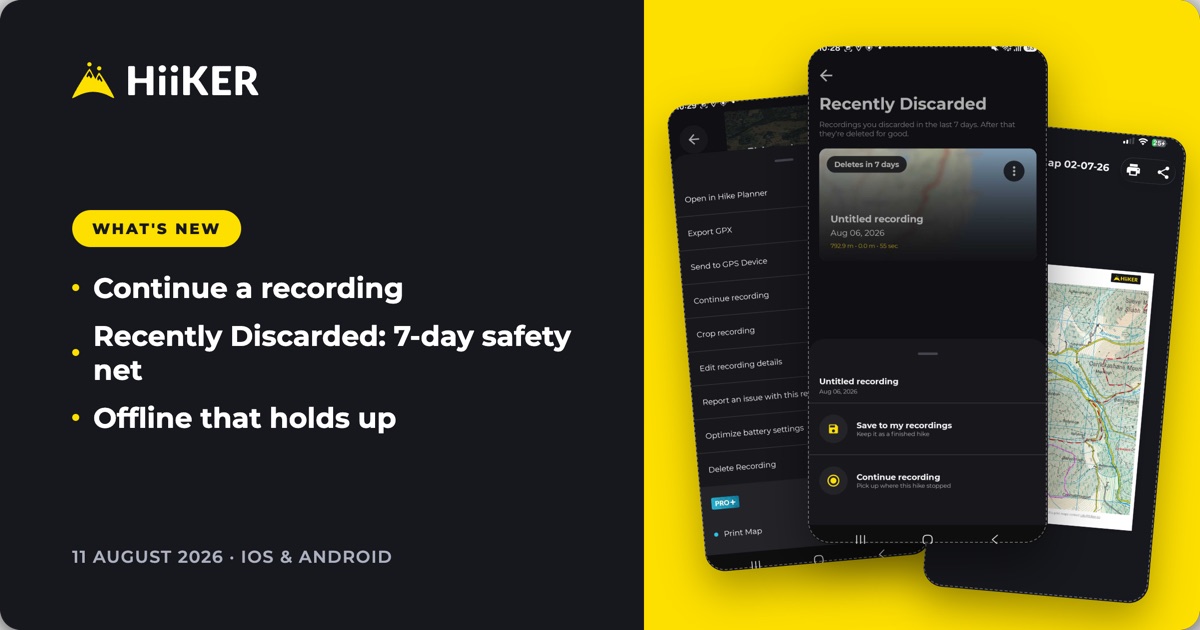
Rolling out now on iOS 26.81 and Android 26.8.1. Update from the App Store or Google Play to get it.
This update is built around one idea: a recording should never be a one-shot thing you either finish or lose. You can now pick a saved recording back up, rescue one you discarded by mistake, and count on your hikes loading properly when there’s no signal at all.
🔄 Continue a recording where you left off
Stopped and saved a recording partway through a multi-day trail? You can now continue it from exactly where it ended. Open the recording, tap Continue recording, and your new track is added to the existing hike — no stitching GPX files together afterwards.


One thing worth knowing: recording restarts from wherever you are now, and a straight line joins the gap between where you stopped and where you’ve picked back up. So it’s ideal for resuming at camp the next morning — less so if you’ve travelled a long way in between.
♻️ Recently Discarded — a 7-day safety net
Discarded a recording by mistake? It’s not gone. HiiKER now keeps discarded recordings for 7 days in a new Recently Discarded area — find it in the ⋮ menu on My Recordings.


Each card shows how long you’ve got left before it’s deleted for good. Tap one and you can either Save to my recordings to keep it as a finished hike, or Continue recording to pick up where it stopped.
📡 Offline that holds up
We’ve rebuilt how downloaded content is stored. Instead of a temporary cache that could be cleared out from under you, the full details of your hikes and recordings now live in a durable store on your device — so hike overviews, recordings, stats and images all render properly with no signal at all.
➕ A new add & import menu
The + button on My Hikes and My Recordings is now a proper add and import menu — create something new, or import a GPX file straight into your list. Sharing has moved into the ⋮ overflow menu to make room.
✏️ Edit your hike details
You can now edit the details of hikes you own directly from the hike overview. When you save, you land back on My Hikes with a processing card, rather than being dropped back on the overview.
🗑️ Deleting hikes tells you the truth
Bulk-deleting a long list of hikes used to quietly do nothing. Deletions now report what actually happened, and a delete that times out on a large selection picks up where it stopped instead of silently failing.
📏 Units that stick
Change your units on the web and the app now picks them up properly — and a unit change you make while offline won’t get reverted by an out-of-date value from the server.
📱 On iPhone & iPad
Print maps now open right inside the app. Generate a print map and it opens as a PDF in HiiKER, with print and share buttons right there in the header — no more bouncing out to another app to get it on paper. (Print maps are a PRO+ feature.)

- Health permissions now prompt properly instead of dumping you into iOS Settings.
- Double-tap to zoom on the centre of the map.
- Apple Watch keeps your zoom level when you re-centre on your location.
- Live Locator stats update live in the viewer and match Android’s formatting.
- The map stays still when you toggle fullscreen, and the hike-highlights toggle stays in sync.
- GPX imports with unreadable timestamps now fail with a clear message instead of silently.
🤖 On Android
Sort My Recordings the same way you already sort My Hikes — newest first, title A–Z, or by distance longest or shortest first, alongside the start and end date filters.

- Continue or export a pending recording directly from its card.
- A battery optimisation shortcut, surfaced at the moment it actually protects your track.
- Route arrows scale with zoom, and your own trails now draw above the HiiKER trails overlay.
- The map styles sheet fits on screen properly, and tapping anywhere on a style row starts the download.
- 3D Flyover previews load faster and stay cached while you scroll.
- Search now returns you to the search you left, not the screen underneath it.
🐛 Fixes & polish
- Hikes no longer get stuck on the processing card forever.
- The in-progress download badge stopped sticking and blinking.
- Offline map bounds show up again.
- Full-screen photos render at the right size the first time you open them.
- My Recordings refreshes itself after a GPX import.
- A continued recording shows its real, combined stats when you go to share it.
- Hike overviews show a clear, translated message when something goes wrong, instead of a raw error.
As always, this update is shaped by your feedback — keep it coming. Happy hiking! ⛰️