
Rolling out now on iPhone, Apple Watch, Android and Wear OS. Update from the App Store or Google Play to get it.
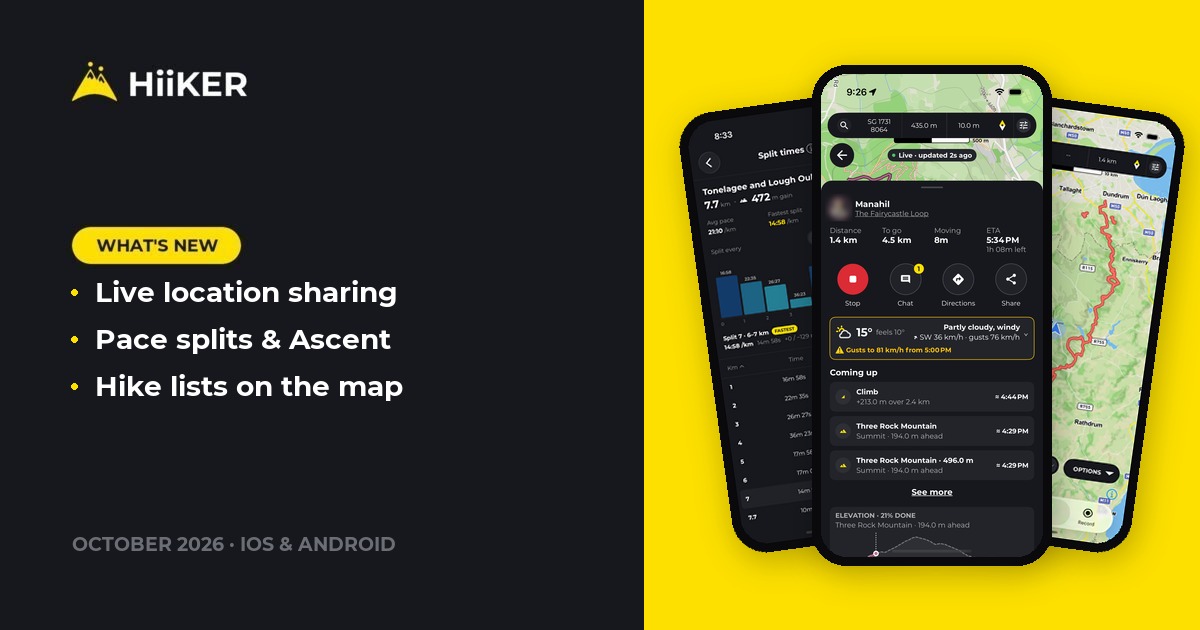
This update rebuilds live location sharing in HiiKER. Whoever follows your hike now sees your battery, how far you’ve got to go, when you’ll finish and the weather ahead, and they can chat with you as you walk. Turn-by-turn also follows you onto alternatives and spurs, your recordings get pace splits and a new Ascent card, and you can bag a peak just by standing on top of it.
📡 Live location sharing for your hike, rebuilt
Live Locator lets the people at home follow your hike on a map. We’ve rebuilt it from the ground up so it tells them what they actually want to know, and keeps working when your signal doesn’t.


- One Live Locator sheet. Choose how long to share for (until your recording ends, or a set time), leave Emergency sharing on so your followers can alert rescue services if they need to, and start. The same sheet becomes your live page, with Stop, Chat, Share and Edit, and who’s following you
- What your followers see: your battery, distance done and to go, moving time and ETA, the weather where you are, and the climbs and peaks coming up on your route
- Chat as you walk. Followers can send a message or a quick reply, and you can answer with a photo straight from your camera
- Follow a recording, not just a planned hike. Switch hikes halfway and your followers see the new route
- Built for patchy signal. Your position is saved on your phone and sent in batches when there’s a connection, so a dead spot no longer leaves a gap. Your own live page keeps working offline too


Starting a share is part of PRO+. Following someone’s hike is free, and works in the app or in any browser. There’s a lot more to it: see Live Locator, rebuilt for the full tour.
🧭 Turn-by-turn on alternatives and spurs
Plenty of long-distance hikes have a high-level alternative, or a short spur out to a viewpoint. Until now, turn-by-turn navigation treated stepping onto one as going off route. Now it guides you along it:
- A heads-up at the junction: “In 200 m, High Level Route branches off to the left”
- On the branch, you hear “Following High Level Route”, then its own turns. Distance and time to go follow the branch, with no off-route warning
- Where an alternative rejoins, you’re turned back onto the main hike. At the end of a spur you’re told to turn around

🔕 Off-route warnings can be muted. Wandered off on purpose? Mute the warnings for 2, 5 or 10 minutes, for the rest of this hike, or for good. A timed mute checks in once more if you’re still off route when it runs out.

You can also start navigation from the hike map now: it’s the first option in the map’s Options sheet.

📈 Pace splits and an Ascent card on your recordings
Tap View splits under the Pace card for a bar for every kilometre or mile of the walk. Taller bars are faster, and your fastest and slowest splits are marked. Change the split length with − and +, or open the full Split times table with the time, pace and climb for each one, and how it compared with your average.
The new Ascent card shows how fast you climbed and came down, and your steepest gradient. Its graph is coloured by how quickly you were gaining height. On the recording map, every graph now sits on top of the elevation profile, so you can see where on the hill your heart rate or pace changed.


Not sure how to read a graph? Tap the ⓘ on any card for a short explanation.

🗂️ Your hike lists on the map
Turn on Hike lists under My Trails in the Maps menu and every hike in your lists is drawn on the map, each list in its own colour. The cog lets you pick which lists to show, and the pencil sets each list’s line style. It’s a quick way to see your bucket list laid out across a region.


Completed hikes now draw above your planned hikes and recordings, so a hike you’ve done no longer disappears under one you’ve planned.
⛰️ Bag a peak from the summit
With peak bagging, a recording that passes over a summit bags it for you. Now, if you’re standing on top without a recording running, open the peak on the map and tap Bag this peak. It only shows when your GPS puts you on the summit.

Deleting a recording that bagged peaks now asks whether to remove those peaks as well, or keep them.
👤 A new Edit Profile, with links
Edit Profile has been redesigned to look like your public profile. You can now add up to three links, such as your blog, a charity you’re walking for, or anywhere else, and they show on your public profile.


Your data, in one download. Settings → Your data builds a ZIP of your recordings, planned hikes and waypoints, and emails you a link.
❤️ Health Connect on Android, and Apple Health on iPhone
- 🤖 Health Connect replaces Google Fit. Google is retiring Fit, so finished hikes now go to Health Connect as a hiking session, with your route, distance and elevation gain. HiiKER asks for access once, when you start a recording
- 📱 Hikes saved on your Apple Watch reach your iPhone and Apple Health more reliably, including ones saved while your phone was locked
✨ Also in this update
- Tidier More menus on hikes and recordings, grouped into sections, with Report issue on recordings. Share is now the main button on your own recordings
- Better place search. Search a mountain, lake or national park and it comes up first, even if you misspell it
- Tap the coordinates on a point of interest to copy them, in your own grid format
- Your completed hikes are private: they no longer show on your public profile
- Downloaded hikes always open offline, however you open them, including lists downloaded on older versions
- Very short recordings save, even if GPS only caught one point
- Turn-by-turn fixes: turns next to a roundabout are no longer missed, and arrows sit on the junction itself
- 📱 Import FIT and GPX files recorded before 2021
- 📱 Very long recordings open without stalling
- 🤖 Fixed the location dot freezing after the first fix when location was set to “Allow all the time”
- 🤖 The full-screen compass now works on phones without a gyroscope
- ⌚ Turn-by-turn on Wear OS now reaches your watch on long multi-day routes

As always, this update is shaped by your feedback, so keep it coming. Happy hiking! ⛰️